These 11 free Wikipedia tools help you trace edits, see how readers move between articles, find claims that need sources, and access research behind paywalls.
The list includes built-in features, volunteer Wikipedia tools, and services from Wikimedia teams and the Internet Archive. Some require an account or browser extension.
On desktop English Wikipedia, look for External tools near the top of an article’s View history page. Links there open WikiBlame, XTools and InternetArchiveBot for that article. Other editions and mobile layouts may differ.
Quick Chooser: Match a Task to a Wikipedia Tool
Use this chooser to match what you want to do to the right Wikipedia tool.
| What you want to do | Tool | What you need |
|---|---|---|
| See who contributed and when | 1. XTools Page History | No account required |
| Find the edit that added or changed a sentence | 2. WikiBlame | No account required |
| See who wrote each part of the text while you read | 3. Who Wrote That? | Chrome or Firefox extension; desktop; supported edition |
| See how readers reach an article and where they click next | 4. WikiNav | No account required |
| Add archived copies for dead links in an article | 5. InternetArchiveBot | A Wikipedia login; running it saves edits under your account |
| Find claims that need a source | 6. Citation Hunt | No account required to browse; adding a source means editing Wikipedia |
| Check article text for possible copying from other web pages | 7. Earwig’s Copyvio Detector | No account required |
| Find articles by category, template, phrase or code | 8. Wikipedia’s search operators | No account required |
| Run one search across a category and its subcategories | 9. PetScan | No account required |
| Follow recent edits across linked pages or a category | 10. Related Changes | No account required |
| Read paywalled journals and databases for editing | 11. The Wikipedia Library | Public collection directory; eligible Wikipedia account for subscription access |
1. XTools Page History: See How an Article Was Built
XTools Page History analyzes an article’s editing activity. It is part of a volunteer-maintained suite hosted on Wikimedia’s cloud servers.
Enter the project, such as en.wikipedia.org, and the article title. Add start and end dates if you want to examine a particular period.
Or click Page statistics on the article’s View history page to fill in those fields automatically.
It ranks contributions three ways:
- Number of edits: how many times each account edited. Ten one-letter fixes count as ten edits.
- Added text: how much text each account added, excluding additions undone in the very next edit.
- Authorship: each editor’s share of the text still on the page, measured by character count.
In the screenshot from Coronavirus disease 2019, a different account leads each ranking. Contributing the most text does not give an editor control over an article.
Authorship figures rely on WikiWho, a separate service. Data may be unavailable for some articles or revisions.
For articles with more than 20,000 revisions, only the latest 20,000 are scanned, according to the Page History documentation.
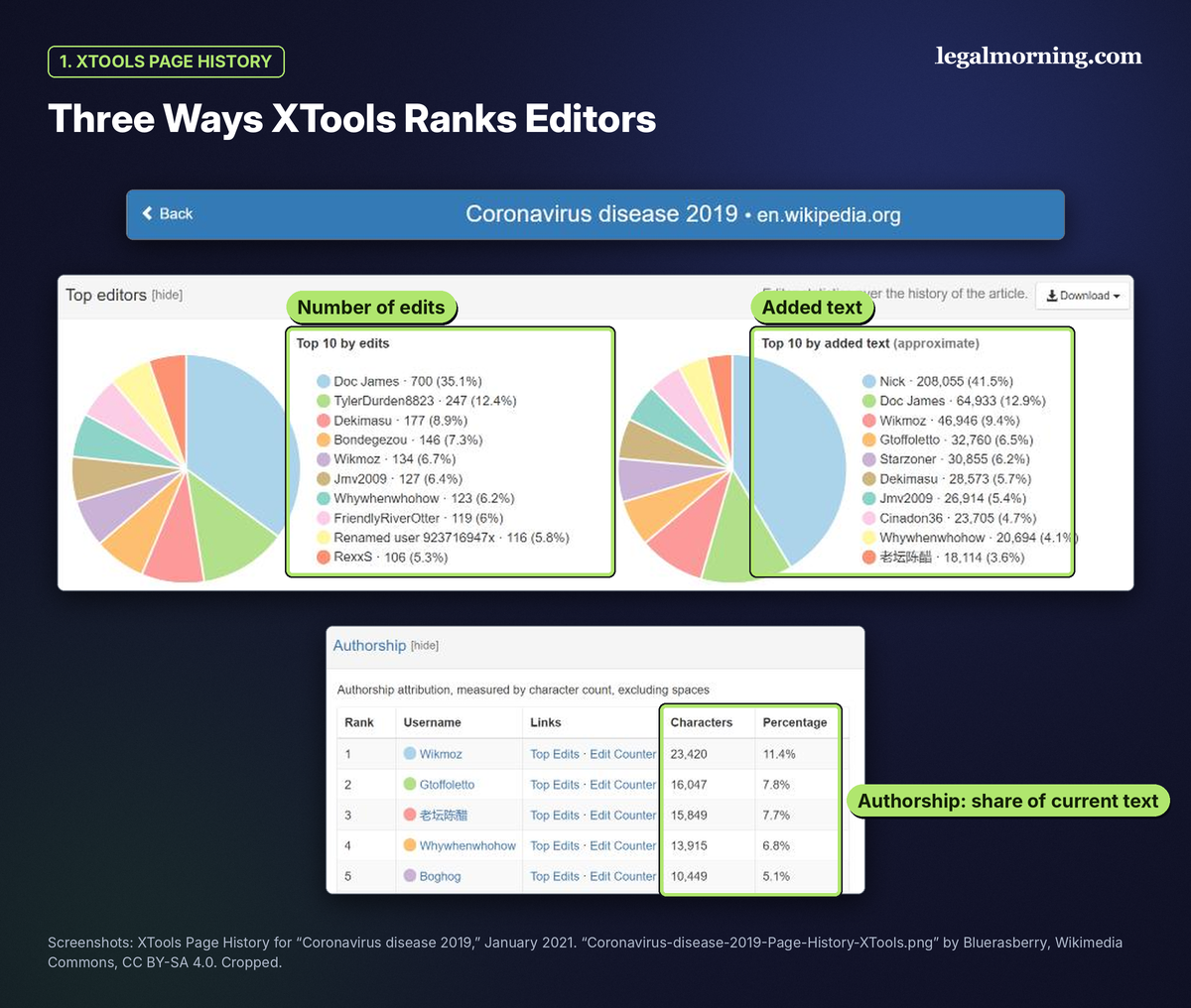
XTools Page History, Top editors and Authorship sections (January 2021 screenshot). Image source; CC BY-SA 4.0
2. WikiBlame: Find When a Sentence Appeared
WikiBlame searches past versions for the edit where specific wording appeared. History pages link to this volunteer tool as Find addition/removal.
- Enter the language, the project and the article name (Page).
- In Search for, enter the exact text you’re looking for.
- Click Start.
- Find the “Insertion found between” result. Click “here” to compare the two versions.
The comparison identifies the editor, date and change, with the editor’s summary.
Searching Pluto for “Light from the Sun takes 5.5 hours” led to an April 2020 edit.
The earlier version already said “Light from the Sun takes about 5.5 hours.” Removing “about” created the exact wording searched for.
This traces wording, not necessarily the first appearance of a fact. Rewording, removal and reintroduction, formatting, and search settings can affect the result.
To find when text was taken out, tick Look for removal of text.
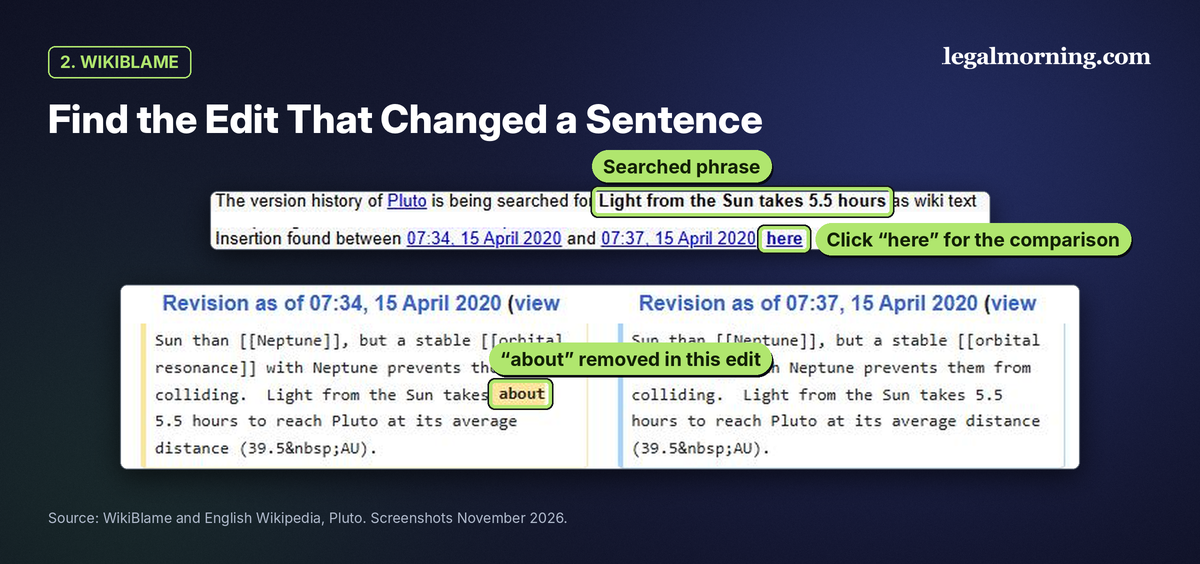
WikiBlame result for the Pluto article and the comparison it links to.
3. Who Wrote That?: See Who Added the Words You’re Reading
Who Wrote That? is a free browser extension from the Wikimedia Foundation’s Community Tech team. It identifies who added the words you are reading.
- Install it from Firefox Add-ons or the Chrome Web Store. The project page links to both.
- Open a Wikipedia article on a desktop computer, in reading mode.
- Open the Tools menu and click Who Wrote That?
Hover over a word to highlight text attributed to the same editor. Click it for the editor, date, edit summary, and estimated share of the page.
It works on supported Wikipedia editions, including English, in desktop browsers.
The attribution concerns the words, not who discovered the facts or found the sources. Templates and some other elements are excluded.
It uses the same WikiWho data as XTools authorship. If data is unavailable, refresh the page or try again later.
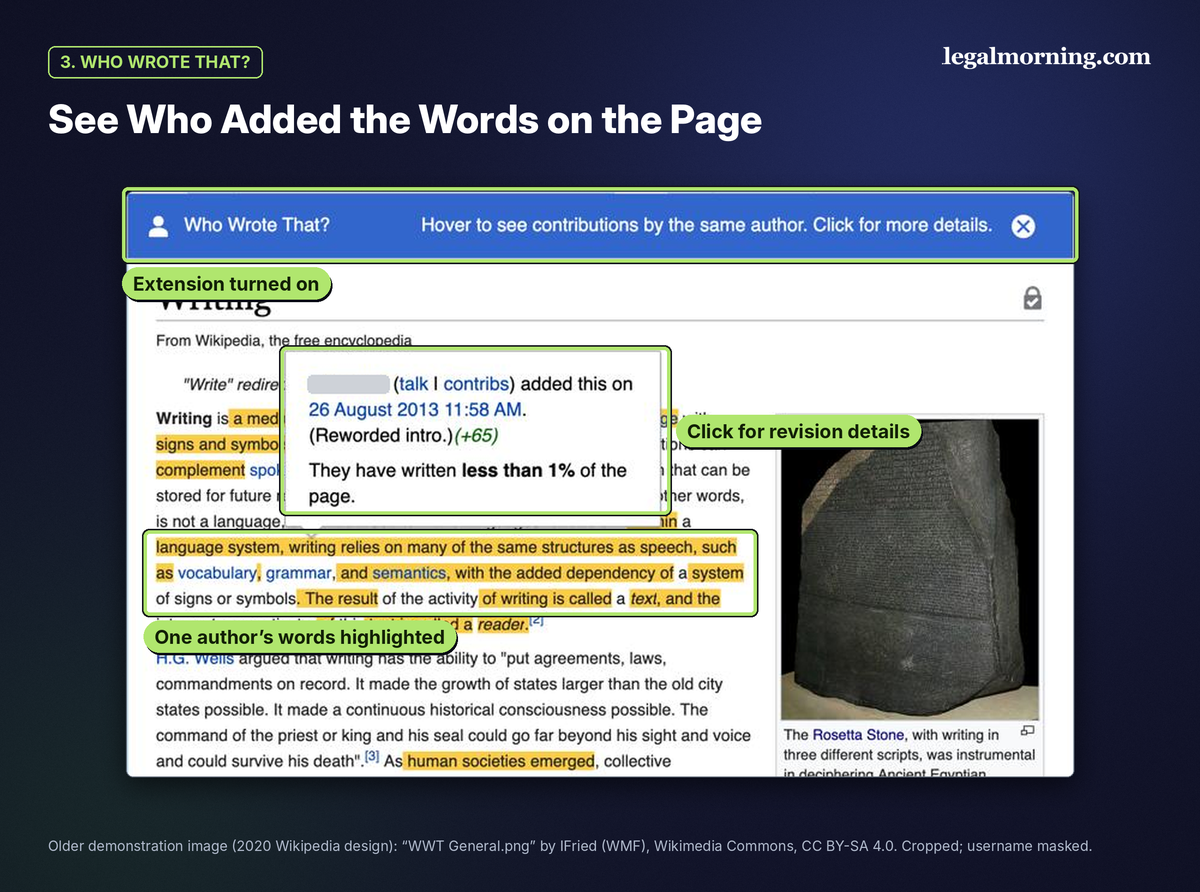
Who Wrote That? in use: the Wikimedia Foundation’s 2020 demonstration image. Image source; CC BY-SA 4.0
4. WikiNav: See How Readers Arrive and Where They Go Next
WikiNav, from Wikimedia Research, shows how readers reach an article and which articles they visit next. Its clickstream data counts these movements by month.
Enter the language edition and the article title.
You’ll see two directions:
- Incoming sources: another article, a search engine, the Main Page, or a visit with no recorded referring page.
- Outgoing navigation: articles opened through links in the selected article.
For Pluto in September 2026, about 45% of incoming views came from search engines and 21% from other Wikipedia articles. Common next stops included Eris, Dwarf planet, Charon and the Kuiper belt.
These monthly totals show navigation patterns, not individual journeys or reasons for clicking.
The chart displays the largest flows. For privacy, the underlying data excludes connections used 10 or fewer times in a month.
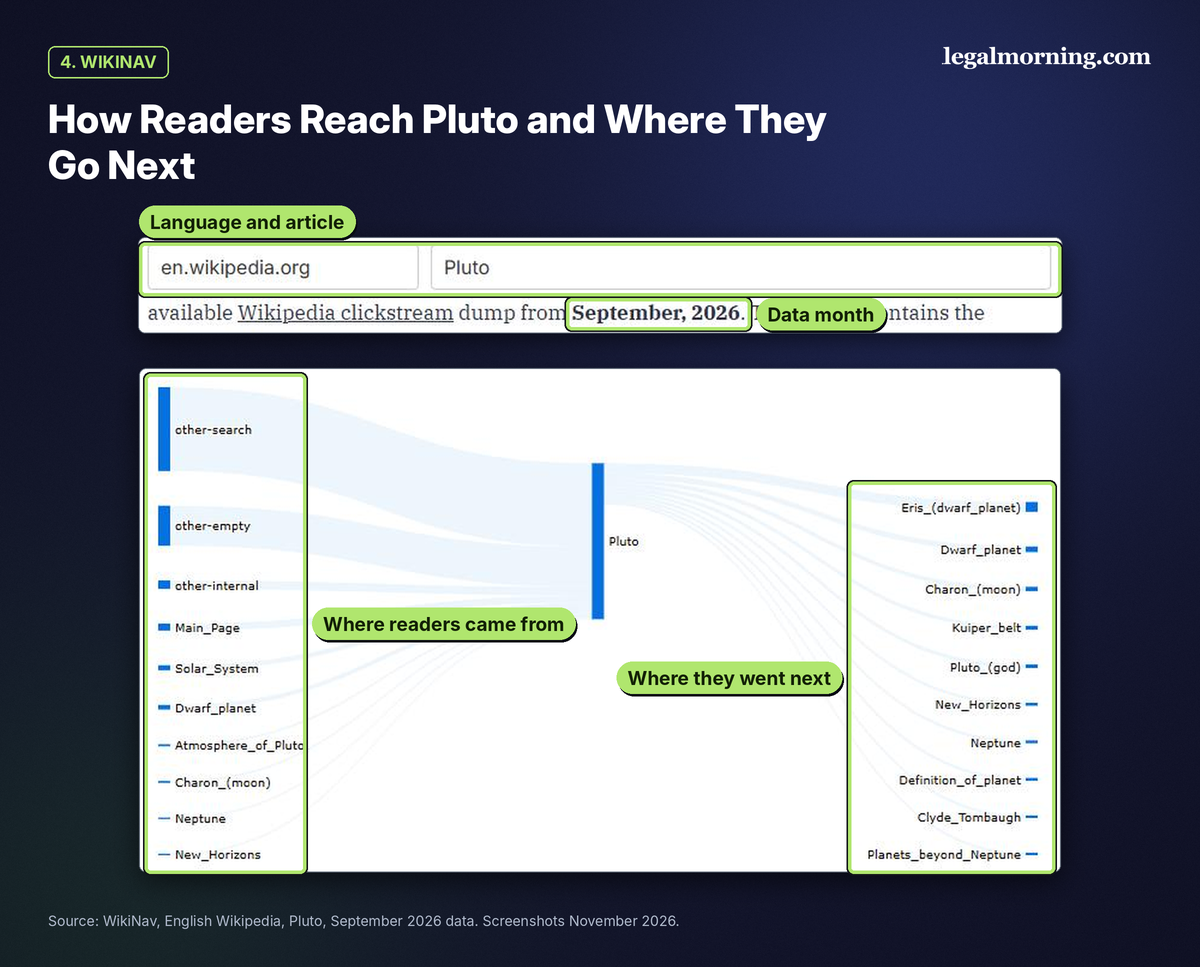
WikiNav for Pluto on English Wikipedia, September 2026 data.
5. InternetArchiveBot: Add Archived Copies for Dead Links
InternetArchiveBot adds archive links to broken Wikipedia citations. Run by the Internet Archive with the Wikimedia community, it can retrieve snapshots from services such as the Wayback Machine.
For a link with no usable archive, the bot may mark it as permanently dead. That describes its search result, not proof that no archive exists elsewhere.
A standard archived citation retains the original URL. When the source is marked dead, its title opens the archive, and the original link appears after it.
To check one article, follow the bot’s documentation:
- Click Fix dead links on the article’s View history page. Or open the IABot Management Interface and choose Run Bot, then Fix a single page.
- Log in with your Wikipedia account.
- Select the correct Wikipedia from the wiki menu at the top right.
- Enter the article title or URL, plus an optional reason.
- Click Analyze.
- Review the reported changes and open the edit comparison.
Analyze can automatically save changes under your account. It is not a preview-only check.
To inspect one archived source without editing, search its URL on the Wayback Machine.
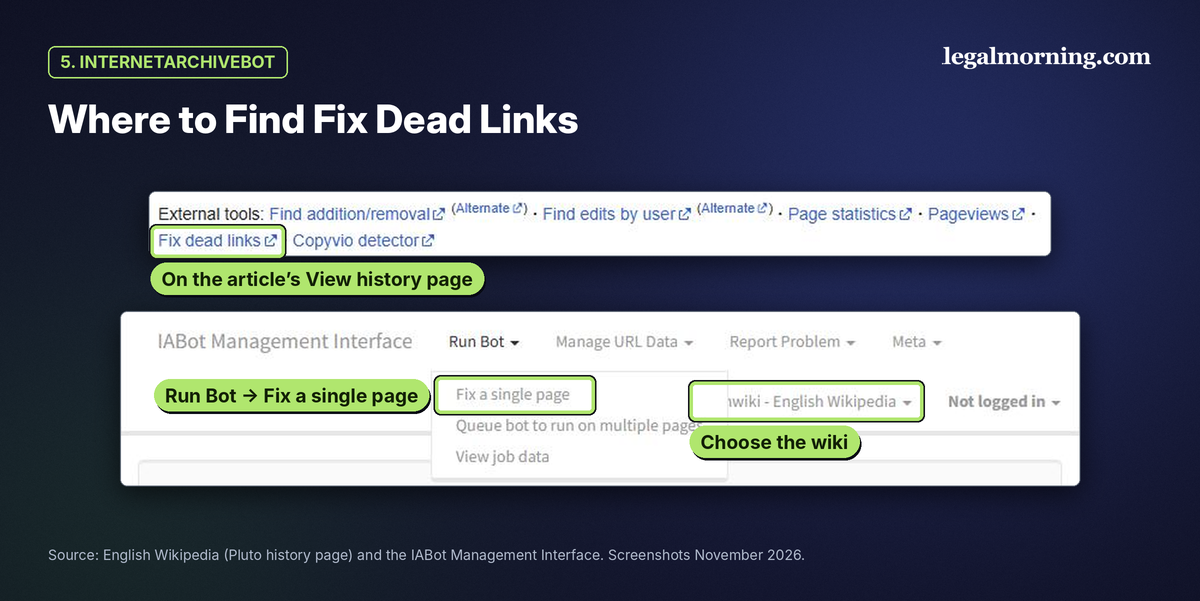
Where to find Fix dead links and the Fix a single page tool.
6. Citation Hunt: Find Claims That Need a Source
Citation Hunt serves passages tagged “citation needed” from Wikipedia articles, one at a time. The volunteer tool supports many language editions.
Click I got this! to open the article, or Next! for another passage. Use the topic box to choose a subject you know.
The tag requests evidence; it does not establish that the claim is false. Read the surrounding context and find a reliable source before changing it.
Adding a source edits Wikipedia. If you are connected to the subject, follow the conflict of interest guideline.
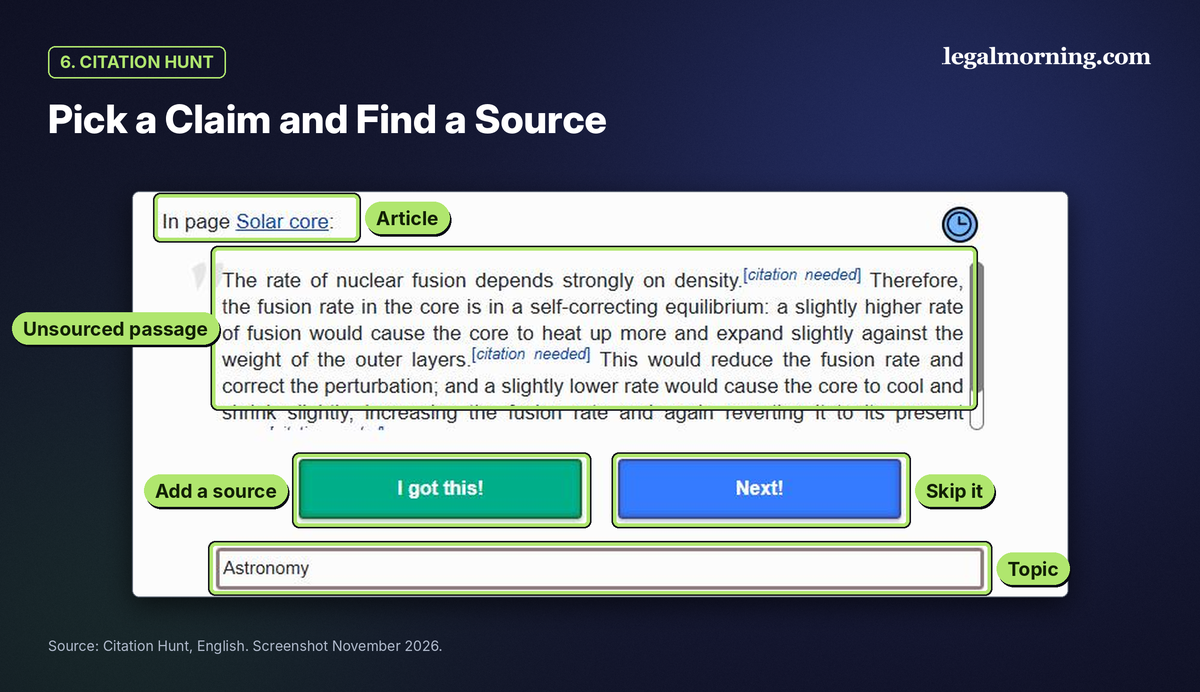
A Citation Hunt snippet from the Solar core article.
7. Earwig’s Copyvio Detector: Spot Possible Copying
Earwig’s Copyvio Detector checks Wikipedia text for possible copying from other websites.
It has two modes:
- Copyvio search checks the article against web search results, the links cited in the article, or both.
- Copyvio compare checks the article against one web address you enter.
Enter the article title, choose a mode and click Submit. Open Compare beside a result to inspect the matching passages.
In the Clyde Tombaugh article example, checking cited links without web search returned “Violation unlikely” and 34.6% similarity to a cited biography.
A score measures overlap, not proven copying. Inspect the matches and check which version came first; other websites may have copied Wikipedia.
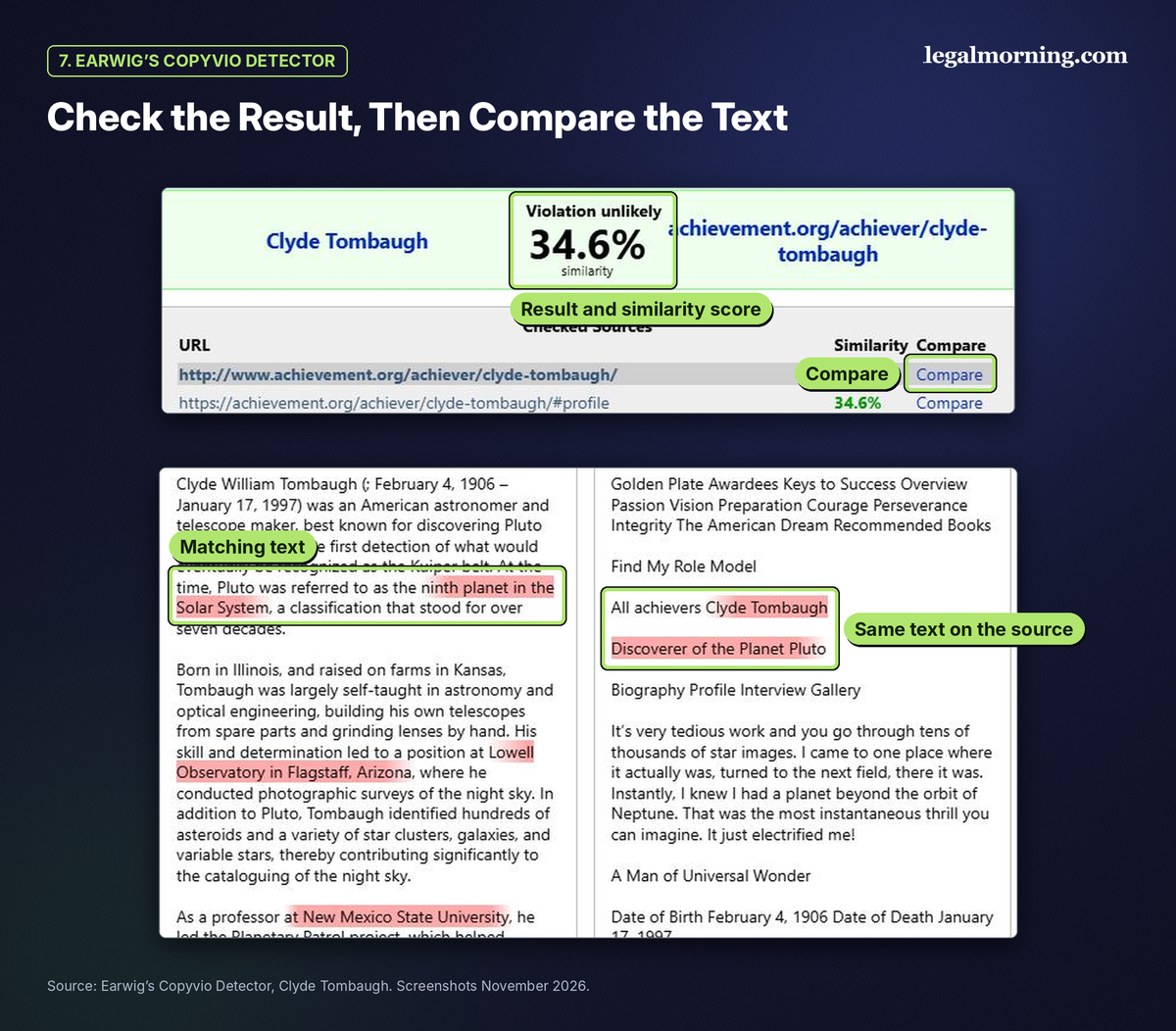
Earwig’s Copyvio Detector result for Clyde Tombaugh and its Compare view.
8. Wikipedia’s Search Operators: Search by Category, Template or Code
Wikipedia’s search box accepts commands for narrowing a search. These operators are documented on MediaWiki:
- incategory: limits results to one category.
- hastemplate: finds pages that use a template, such as a maintenance tag.
- insource: searches the page’s code, not just the text readers see.
- Quotation marks find an exact phrase.
Combine them to find articles in Dwarf planets that use the citation needed template:
incategory:"Dwarf planets" hastemplate:"Citation needed"
To find a website address in page code:
insource:"achievement.org/achiever"
An insource match can be a citation, ordinary link or other mention. Indexing and text supplied through templates can affect results.
incategory does not include subcategories. Use PetScan to search those too.
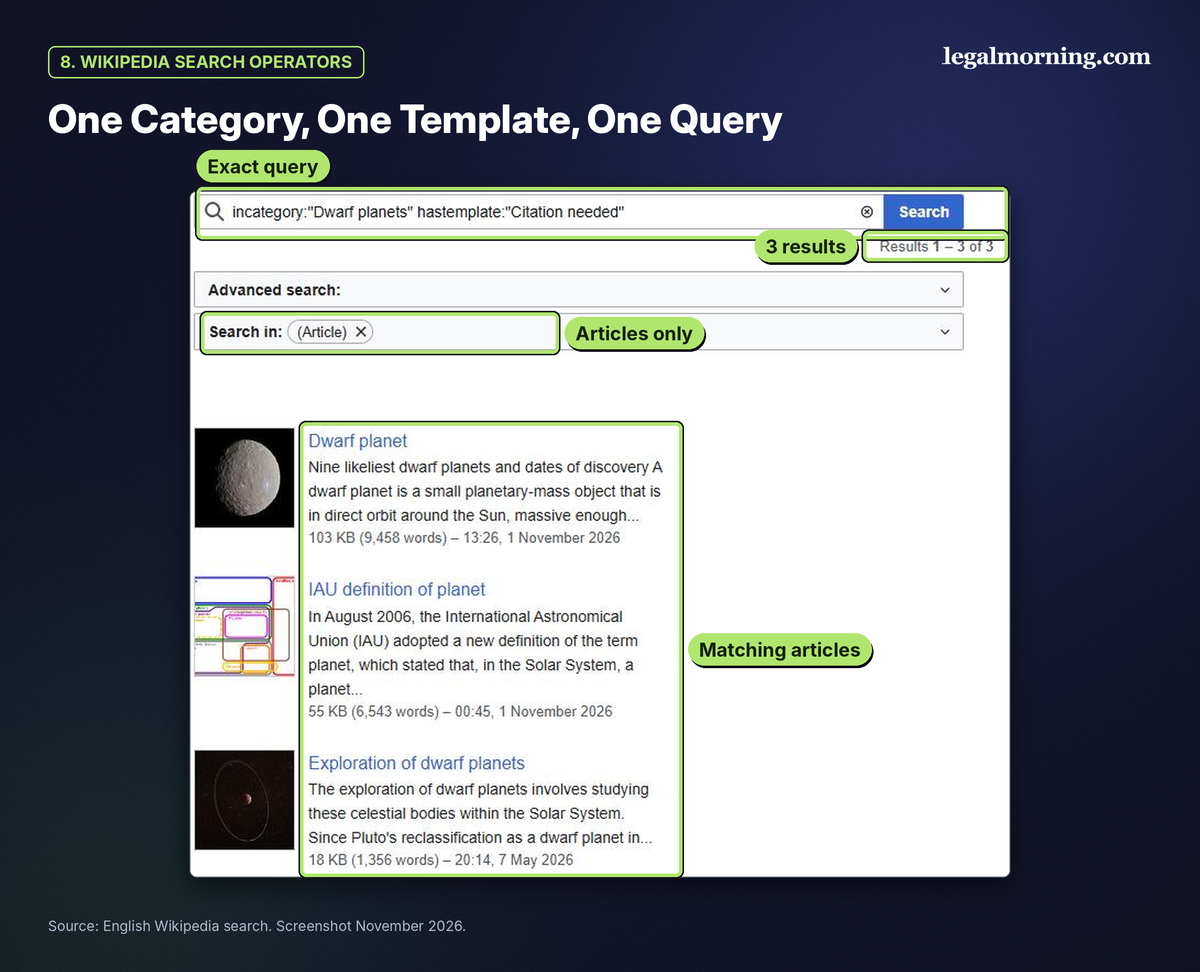
The category and template query above, with its results.
9. PetScan: Search a Whole Category Tree at Once
PetScan combines category searches with filters such as required templates. Its documentation is on Meta-Wiki.
To repeat the search above across subcategories, use these settings:
- Categories tab: language en, project wikipedia, depth 1, category Dwarf planets. Depth 1 includes direct subcategories.
- Page properties tab: namespace Article.
- Templates&links tab: under Has all of these templates, enter Citation needed.
- Click Do it!
In November 2026, this PetScan query returned 18 articles, compared with three from the search box. Including subcategories widened the search.
All three search results appeared in PetScan’s list, along with astronomers and other subjects in the subcategories. Check the results before assuming every page fits your topic.
Download the results or share the saved query link.
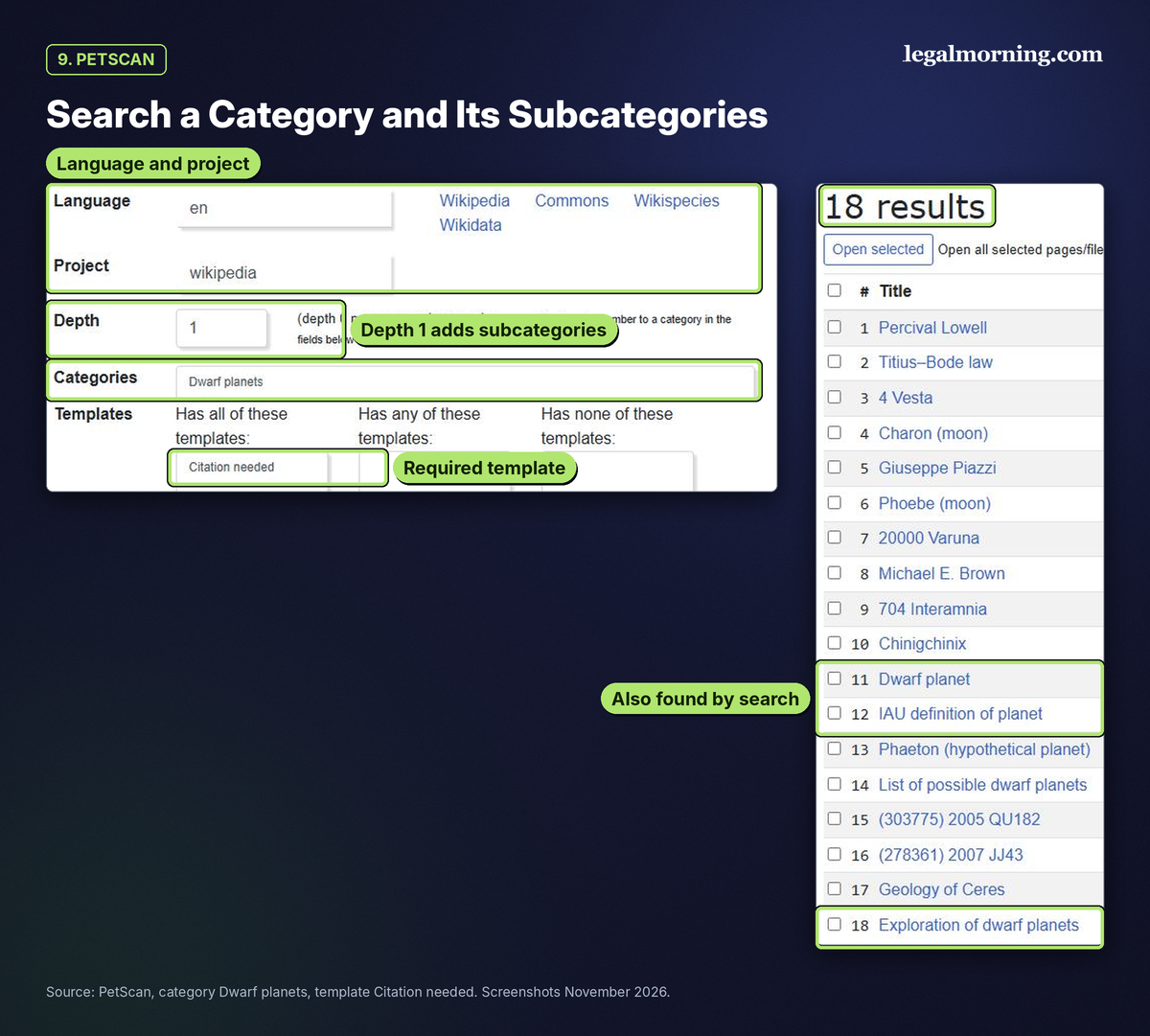
PetScan settings and results for Dwarf planets, depth 1, with the citation needed template.
10. Related Changes: Follow Recent Edits Across a Topic
Related Changes lists recent edits to pages linked to or from a selected page. Open it from the Tools menu or go to Special:RecentChangesLinked.
Choose the scope:
- Pages linked from: edits to pages linked by your selected page. Pages linking to: edits to pages that link back to it.
- For a category, Pages linked from lists changes to its members.
Related Changes for the Dwarf planets category shows edits to pages such as Haumea and Makemake. Click diff to inspect a change.
The selected page’s own edits are excluded. Its related talk pages are not automatically included, as the help page explains.
The default is 50 changes from the past seven days; you can select up to 1,000 changes and 30 days. A result limit can leave out older edits within that period.
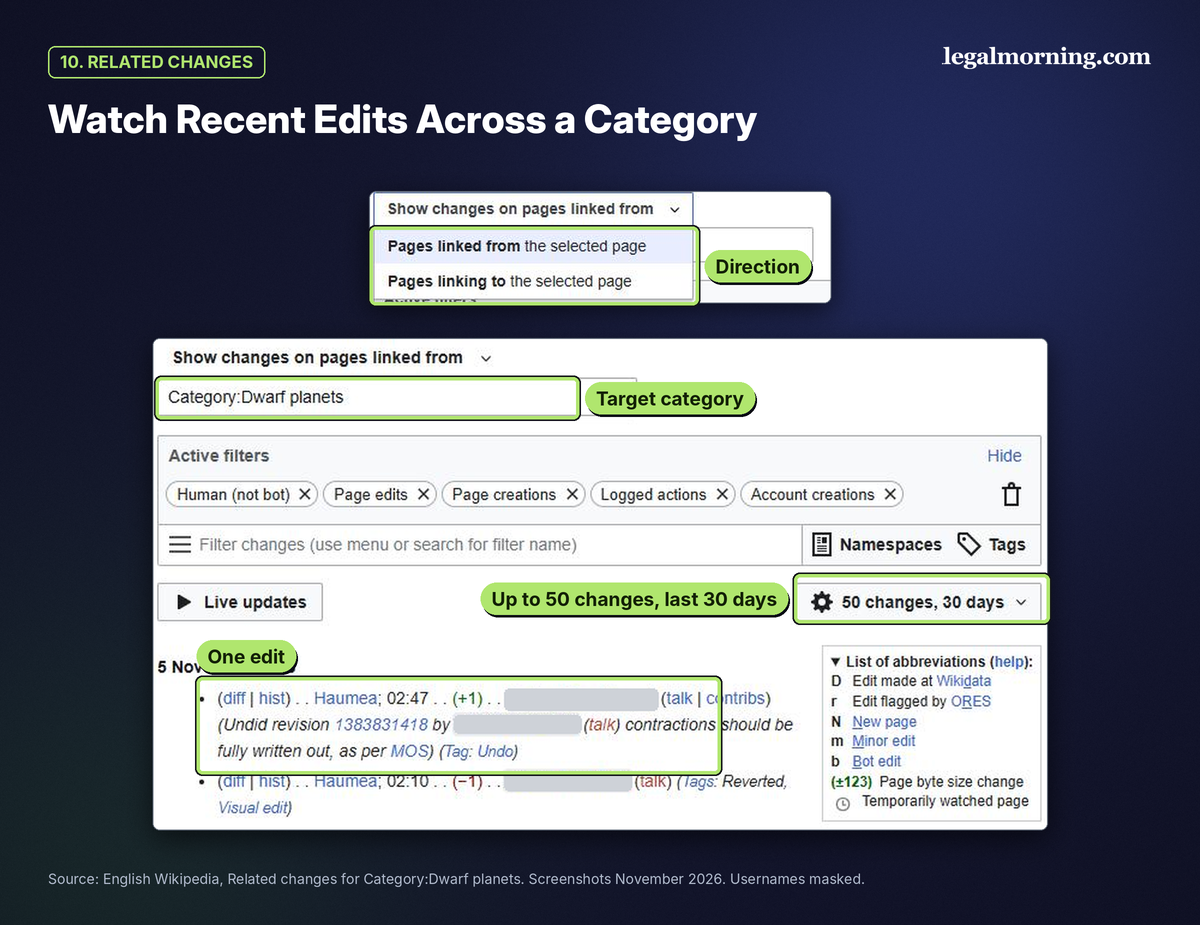
Related Changes for Category:Dwarf planets.
11. The Wikipedia Library: Free Access to Paywalled Sources
The Wikipedia Library provides active editors with subscription sources for researching Wikipedia contributions. Its collections include more than 100 databases, journals and archives.
Anyone can browse collection descriptions. Accessing subscription content requires an eligible account.
Automatic access requires all four:
- 500 or more edits
- 6 or more months of editing
- 10 or more edits in the last 30 days
- no active blocks
Log in with your Wikipedia account. Eligible editors can use Library Bundle collections without applying.
Other collections have limited places and require an application. Some partner content may remain paywalled, as the Library’s page on Wikipedia explains.
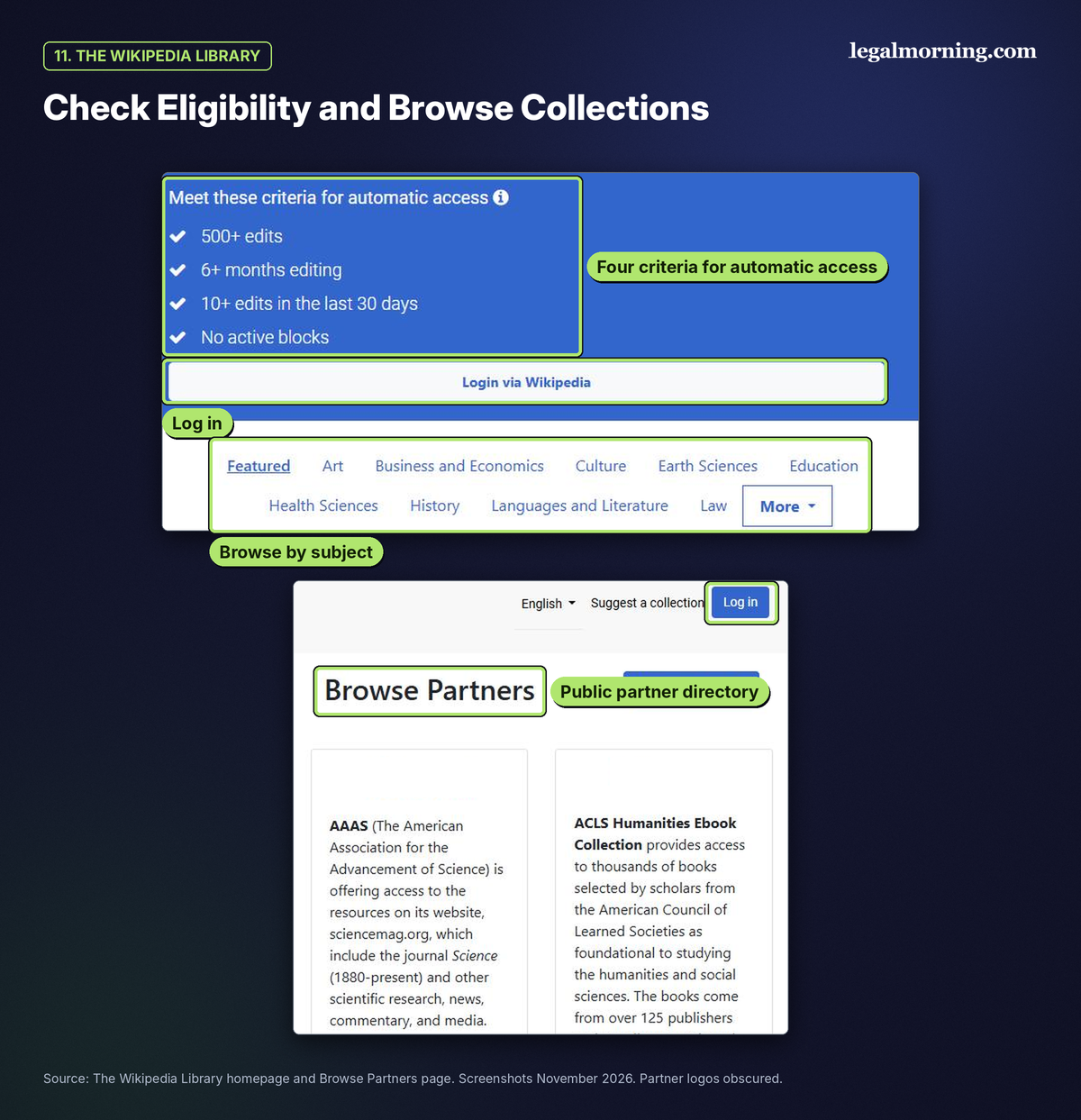
The Wikipedia Library homepage and its public partner directory.
Where to Start With These Wikipedia Tools
Each of these Wikipedia tools answers a different question. Use WikiBlame to trace a sentence, XTools to examine contributors, and WikiNav to explore navigation. If you want to improve an article, Citation Hunt can help you find an unsourced claim to investigate.
Choose the tool that answers your question, then check the relevant edit, source or result. If you would rather have a page watched for you over time, consider our Wikipedia monitoring service.