Use Wikidata to check public information about your business, research other companies, and build research lists.
What Wikidata is
Wikidata is a free database hosted by the Wikimedia Foundation, the nonprofit behind Wikipedia. Anyone can read and edit it.
Wikipedia describes a company in paragraphs. Wikidata, by contrast, records individual facts, such as its headquarters or founding date, in labeled fields that software can read.
Here are the parts you need to recognize:
- Item. A page about a person, company, place, or other subject. Each has an ID beginning with Q. Dutch Bros. Coffee is Q5317253.
- Statement. A fact recorded on the item, such as “headquarters location: Tempe.” Extra details, called qualifiers, can show when that fact applied.
- Reference. A source supporting the statement, such as a company filing or news report.
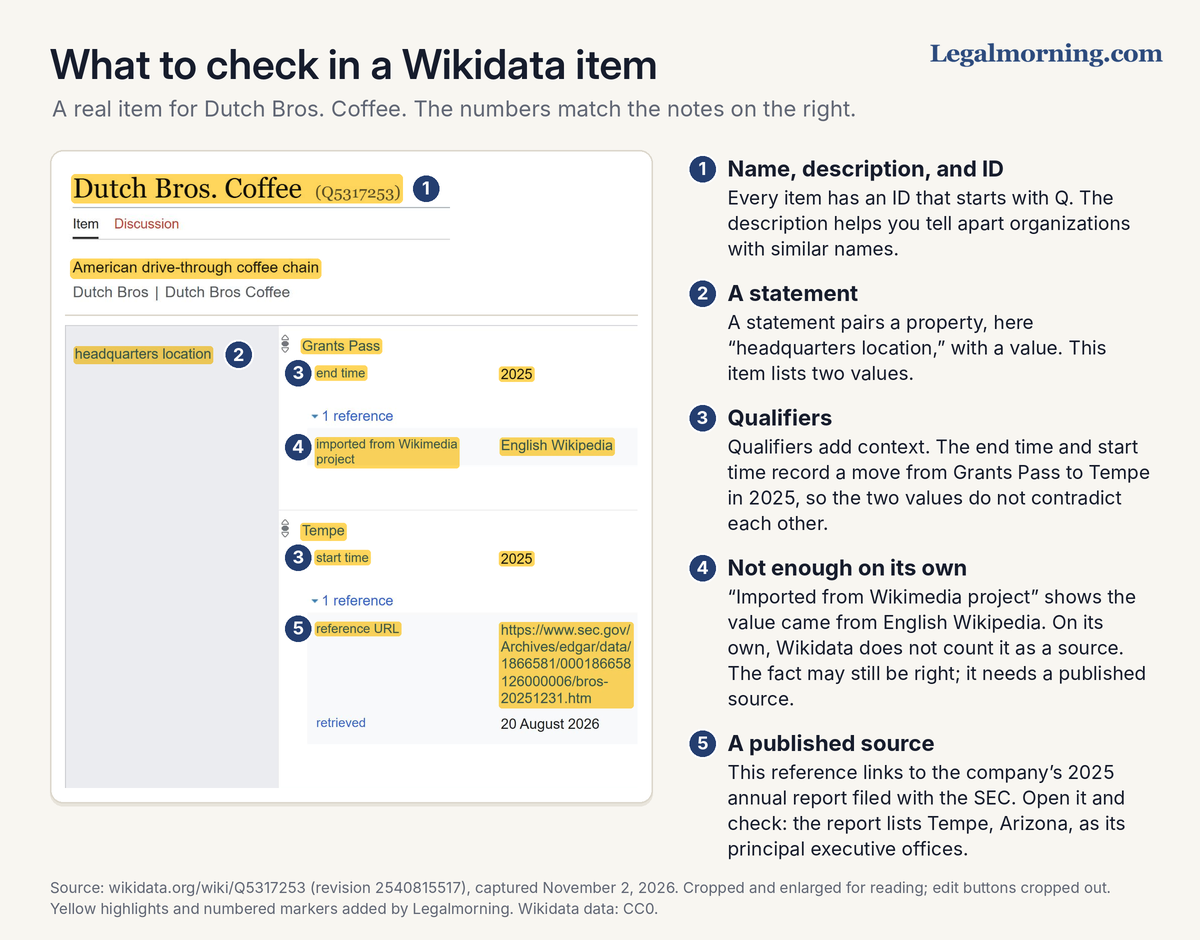
Part of the Wikidata item for Dutch Bros. Coffee, captured November 2, 2026. The numbered notes and yellow highlights were added by Legalmorning.
How to check what Wikidata says about your business
- Search for your business. Try its legal name, brand name, former names, and abbreviations in the search box on wikidata.org.
- Confirm the match. Check the description, country, website, and founding date. Similar names can belong to different organizations; each item has its own Q number.
- Check the facts. Review the website, headquarters, founding date (labeled “inception”), and any ownership or parent-organization information.
- Read the references. Open the sources and check whether they support the statements.
- Check the dates. Two headquarters can both be correct if they refer to different periods. The Dutch Bros. item records when Grants Pass stopped being its headquarters and Tempe became its headquarters.
- Check the rank. The small icon beside a value shows whether editors marked it normal, preferred, or deprecated. Preferred can indicate a current or best-supported value; deprecated flags an error. Neither replaces checking the source.
- Gather evidence. Save annual reports, government filings, or other reliable publications supporting anything you think needs correcting.
One reference deserves a closer look. “Imported from Wikimedia project” is a tag that import tools add when a value comes from a Wikimedia project, such as English Wikipedia. Wikidata’s help page says a statement backed only by that tag is not considered sourced. The fact may still be right. Even then, it needs a published source.
No item for your business? Read “Before you create or change a Wikidata item” before creating one.
Key Point: Your organization does not own its Wikidata item. It is a shared public record that anyone can edit, and Wikidata says it is not a place for self-promotion, advertising, or marketing.
What to do when you find an error
Prepare the following before editing:
- The statement. Record the item’s Q number, the field name, and the value you want reviewed. Check its dates first: an old headquarters with an end date may be accurate history.
- The correction. Write what should change and why.
- The evidence. Keep the URL of a reliable publication supporting the correction.
If you are paid to contribute, including as part of your job, disclose that before editing. The disclosure requirements are explained below.
Wikidata’s guidance for editing about yourself generally allows you to edit the item about yourself or an organization you represent. You can add a missing fact or a better source, with a reference.
That guidance asks you not to remove a sourced statement about yourself simply because you think it is wrong. Explain the problem and provide your evidence:
- Item discussion. Open the Discussion tab and post the disputed statement, proposed correction, and source.
- On Project chat. Use Project chat, Wikidata’s main discussion page, when you need help from the wider community.
- Keep accurate history. Add dates to distinguish former headquarters or owners from current ones, rather than deleting correct historical information.
- Do not keep changing it back. Wikidata’s help page on ranks says edit warring over values is not acceptable. If someone undoes your edit, discuss it instead.
Research companies and markets with Wikidata
Wikidata can help answer these business-research questions. Use the references and outside sources to check what you find.
| Question | What Wikidata may show | Where to confirm it |
|---|---|---|
| Who owns this company? | “Owned by” and “parent organization or unit” statements, sometimes with dates | Annual reports, regulatory filings, the company’s website |
| Where is it based? | Headquarters location, sometimes with start and end dates | The company’s website or latest filing |
| When was it founded? | An inception date | The company’s history page, filings, news coverage |
| Who started it, and who runs it? | Founder and chief executive officer statements | The company’s leadership page and recent news releases |
| What similar companies exist? | Other items with the same type and country, such as “café chain” | Trade associations, trade press, the companies’ own websites |
| Is this the same company as in another database? | ID numbers from other databases, such as a Legal Entity Identifier or OpenCorporates ID | The other database itself |
Know the limits:
- Coverage is incomplete. Some companies have no item; others have only a few facts recorded.
- It is not a ready-made sales list. Verify organizations and obtain current contact details elsewhere before planning outreach.
- Missing information is not evidence of absence. A fact may not have been added, or a company may be classified differently from what your query expects.
Build a research list with the Wikidata Query Service
The Wikidata Query Service lets you find items using conditions such as company type and country.
This example finds items classified as “café chain” with the United States recorded as their country. It lists their headquarters, websites, and founding years where available.
To run it:
- Open the query. This link opens the ready-made query in the Query Service. You do not need to type or change anything.
- Run it. Click the blue play button on the left side of the editor, or press Ctrl + Enter.
- Read the results. The table lists each company’s Wikidata link, name, headquarters, website, and founding year.
- Export the list. Choose CSV file from the Download menu above the results, then open or import it in Excel or Google Sheets.
The November 2, 2026 run returned 43 rows. The graphic shows the first 16.
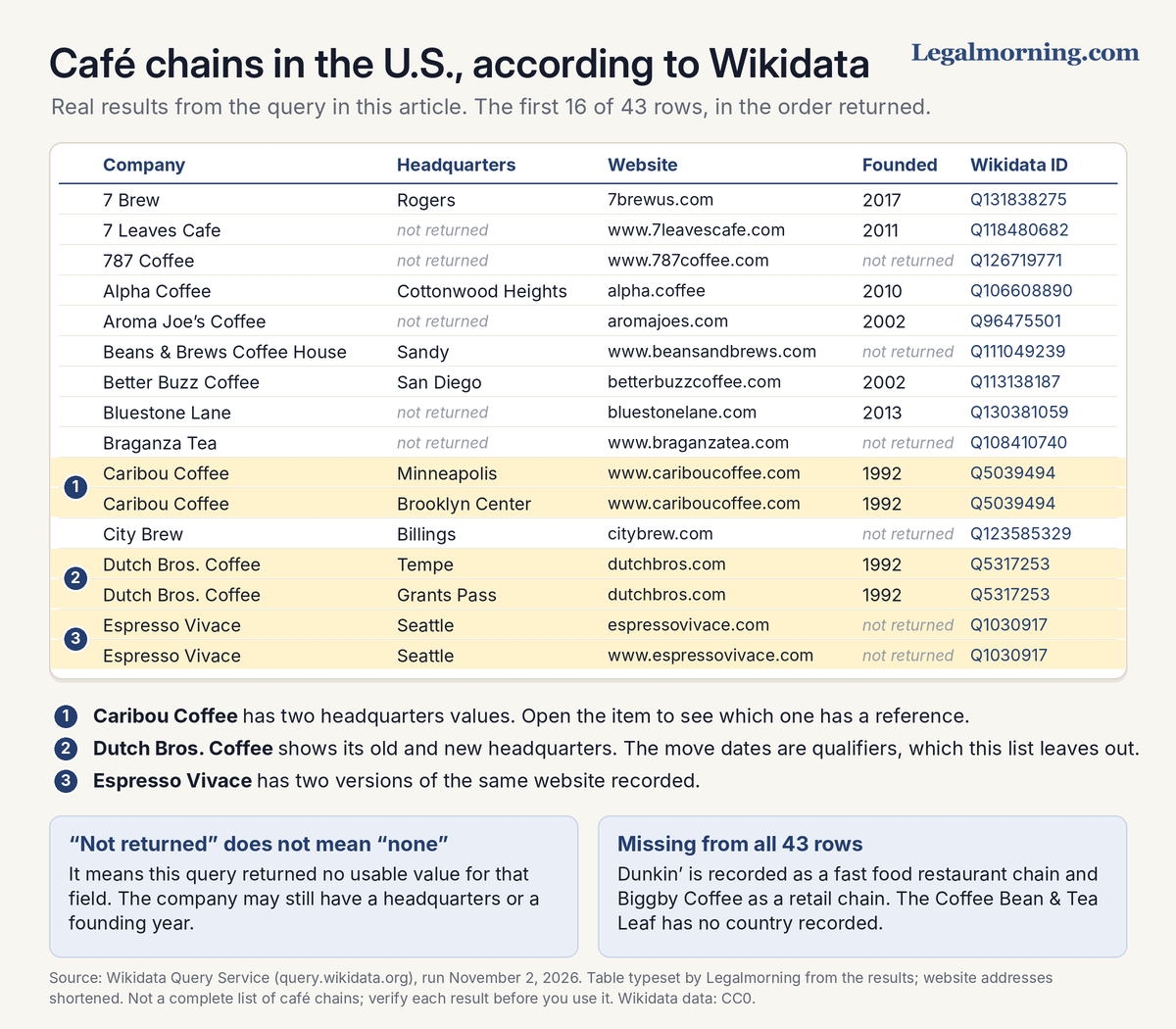
Real results from the query above, run November 2, 2026, and typeset for reading. Not a complete list of café chains.
Check the results before you use them
- Repeated companies. Multiple headquarters or websites can produce several rows for one company. Two headquarters combined with two websites produce four rows, so 43 rows does not mean 43 companies.
- Historical values. Both Dutch Bros. headquarters appear because both have normal rank. This query uses preferred values when available and otherwise normal values; it does not read the move dates. Check the item before assuming every location is current.
- Blank fields. “Not returned” means the query found no usable value. It does not mean the company has no headquarters or founding date.
- Sources. Open each company’s item and check the references before relying on the result.
- Missing companies. Dunkin’ and Biggby Coffee use different classifications in these records. The Coffee Bean & Tea Leaf has no country recorded. None appears in this query, even though each has a Wikidata item.
Key Point: A query gives you a starting point for research. It is not a finished list, and it is not a mailing list.
The optional appendix contains the query code. The ready-made link runs it without any coding.
Wikidata and Google Knowledge Panels
A Knowledge Panel is the box of facts that can appear in Google’s results when you search for a company, person, or place.
Google says panels are generated automatically and that panel information comes from various sources across the web. Much of it comes from Google’s Knowledge Graph, which Google describes as its database of billions of facts about people, places, and things.
Other information can include Wikipedia descriptions, movie ratings from IMDb or Rotten Tomatoes, social profiles, and changes suggested by verified representatives. Google also works with data partners on subjects such as movies and music.
Businesses that serve customers at a location or within a service area can claim or create a separate Business Profile.
The Wikimedia Foundation says Google uses Wikimedia’s tools to bring in content from Wikidata and other Wikimedia projects, for example in Knowledge Panels.
The Dutch Bros. comparison shows four matching facts, a partial match for the founding date, and an owner listed by Google but absent from the Wikidata ownership field.
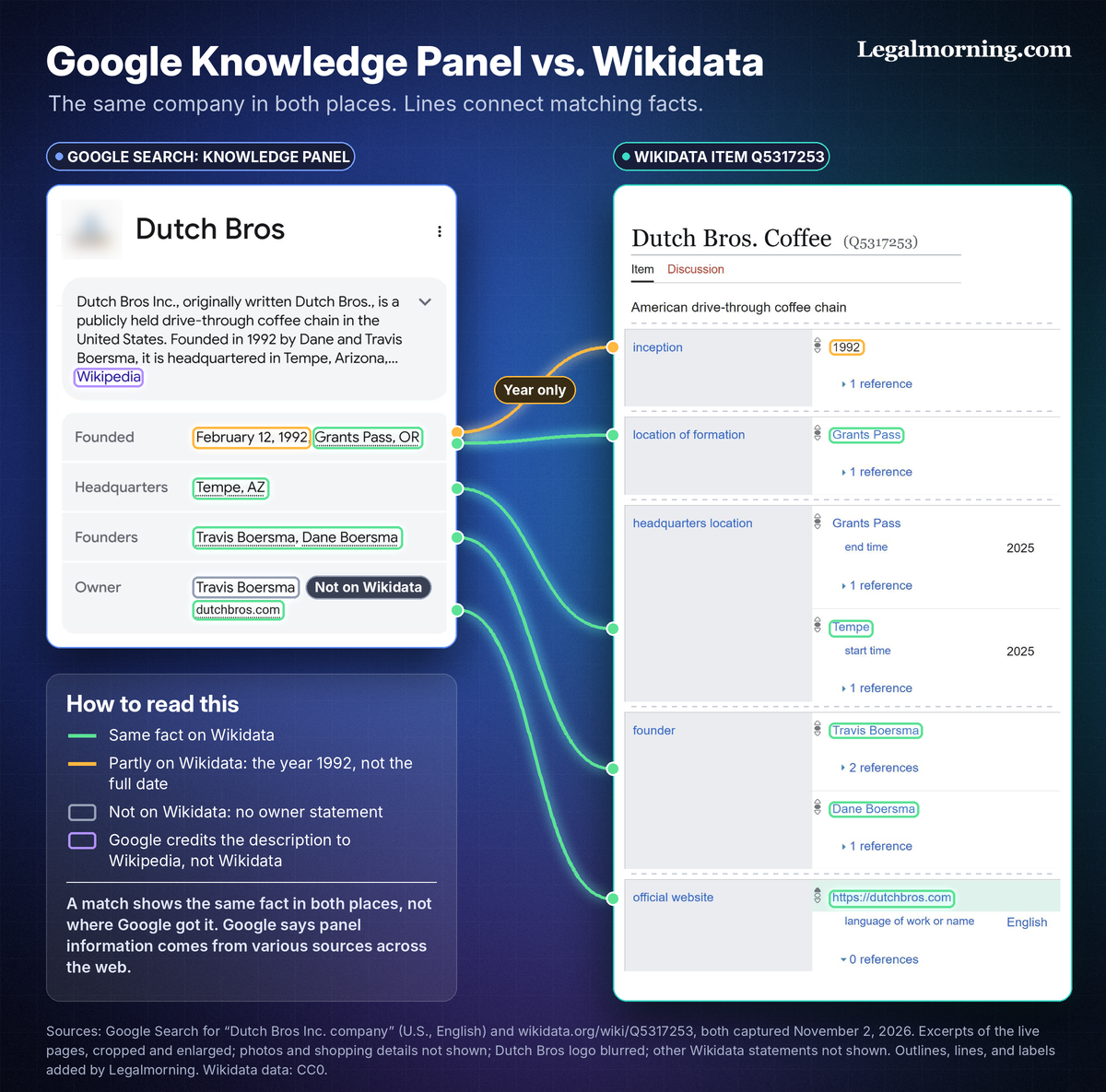
The Dutch Bros. Knowledge Panel and Wikidata item, captured November 2, 2026. The outlines, lines, and labels were added by Legalmorning.
A match shows that both places list the same fact. It does not, however, show where Google got it.
Still, a Wikidata item does not guarantee a Knowledge Panel or determine what it displays.
Correcting Wikidata is not the same as sending Google feedback
- Wikidata correction. Updates the item. Other editors can review or undo the edit, and Google may not adopt it.
- Google feedback. Asks Google to review the panel itself. Anyone can submit feedback; verified representatives can suggest changes. Google decides whether to accept them.
What about AI search?
Yes. Wikidata can influence AI search indirectly through systems that use its facts.
For example, those facts help software distinguish a company from others with similar names and connect it with information such as its owner or headquarters.
The clearest documented route, however, runs through Google. Wikidata can feed the Knowledge Graph, and Google says the model behind AI Overviews works in tandem with its Search systems, including the Knowledge Graph.
This does not establish that every AI product uses Wikidata or that AI Overviews copy the visible panel. A Wikidata correction also does not guarantee a change in an AI answer.
Our guide to how Wikipedia and Wikidata influence AI search results explains the connections in more detail.
Before you create or change a Wikidata item
- Search first. Check current and former names to avoid creating a duplicate item.
- Check notability. Wikidata has its own notability policy, separate from Wikipedia’s. A Wikipedia article is one way to qualify, but not the only way. An organization can also qualify if it is clearly identifiable and can be described using serious, publicly available references. Items that do not qualify can be deleted.
- Use neutral, supported facts. Leave out sales language. Your organization’s website can support appropriate facts about the organization itself; it does not establish every claim or prove eligibility for an item.
- Disclose if you are paid. Wikidata’s paid editing policy requires you to disclose every organization or person that pays you to contribute. The Wikimedia Foundation’s Terms of Use also require you to disclose your employer, client, intended beneficiary, and affiliation.
Wikidata’s community also has an essay on self-promotion that strongly discourages creating an item about your own organization. An essay is advice, not a rule. Check whether the page is labeled as a policy, essay, or proposal before treating its advice as a rule.
Putting Wikidata to work
Start by finding your organization’s item and checking its references against reliable records. Note any corrections, then try the café-chain query to see how a research list works. Use what you find to guide further research, checking sources before relying on the results.
For a free evaluation of what Wikidata says about your organization, contact Legalmorning.
Appendix: The query code
Copy this code if you want to inspect or adapt the example. The ready-made link in the walkthrough contains the same query.
Optional: the query code
SELECT ?company ?companyLabel ?headquartersLabel ?website (YEAR(?inception) AS ?founded) WHERE {
  ?company wdt:P31 wd:Q76212517 ;
           wdt:P17 wd:Q30 .
  OPTIONAL { ?company wdt:P159 ?headquarters . }
  OPTIONAL { ?company wdt:P856 ?website . }
  OPTIONAL { ?company wdt:P571 ?inception . }
  SERVICE wikibase:label { bd:serviceParam wikibase:language "en". }
}
ORDER BY ?companyLabel
This query finds items classified as café chains with the United States as their country. OPTIONAL keeps a matching company in the results even when a requested field is blank.